
Library Author
PerfectContributionsView
GitHub 기여도 그래프를 iOS 앱에 그대로 재현하는 뷰 라이브러리
SwiftUIKitCocoaPodsCarthageSPM
iOS 9+Platform
MITLicense
SPM · CocoaPods · CarthagePackage Managers



Table of contents
Screenshots
iPhone
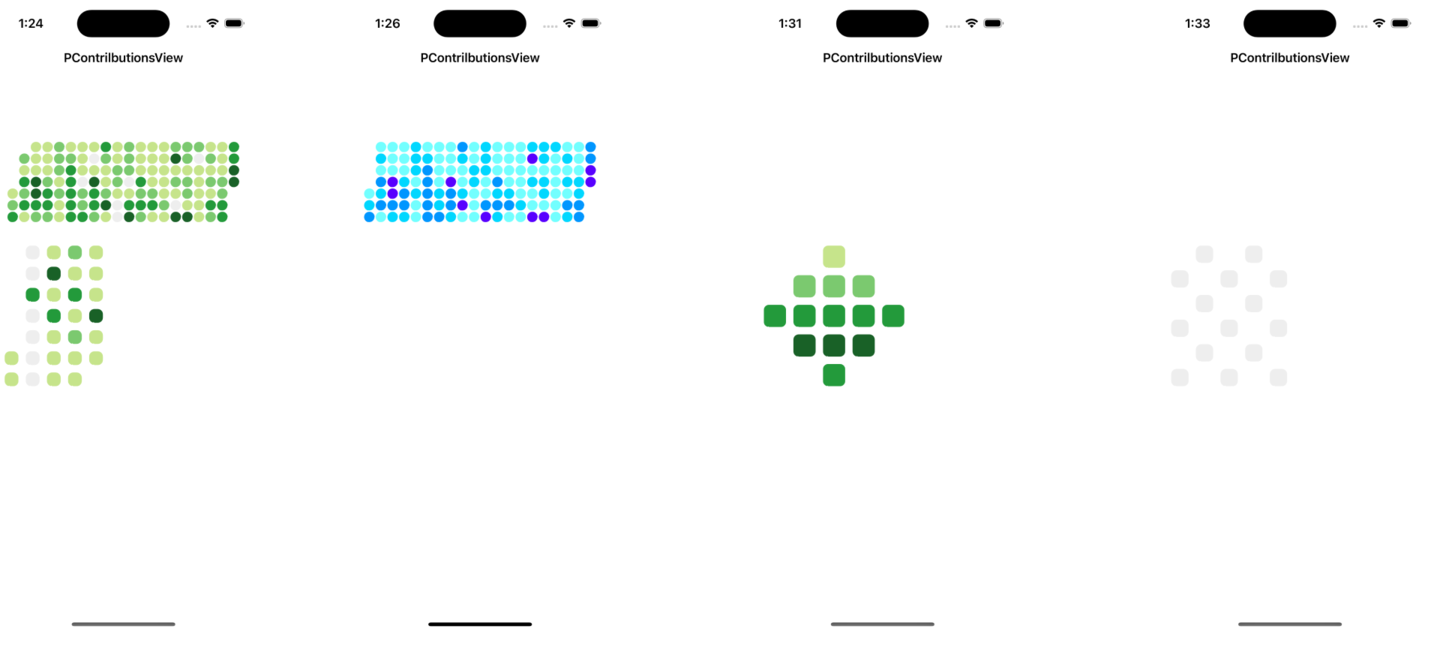
Installation
CocoaPods
For iOS9+
use_frameworks!
target '<Your Target Name>' do
pod 'PContributionsView'
endCarthage
For iOS9+
github "jjunhaa0211/PContributionsView"SPM
For iOS13+
https://github.com/jjunhaa0211/PerfectContributionsViewSetup
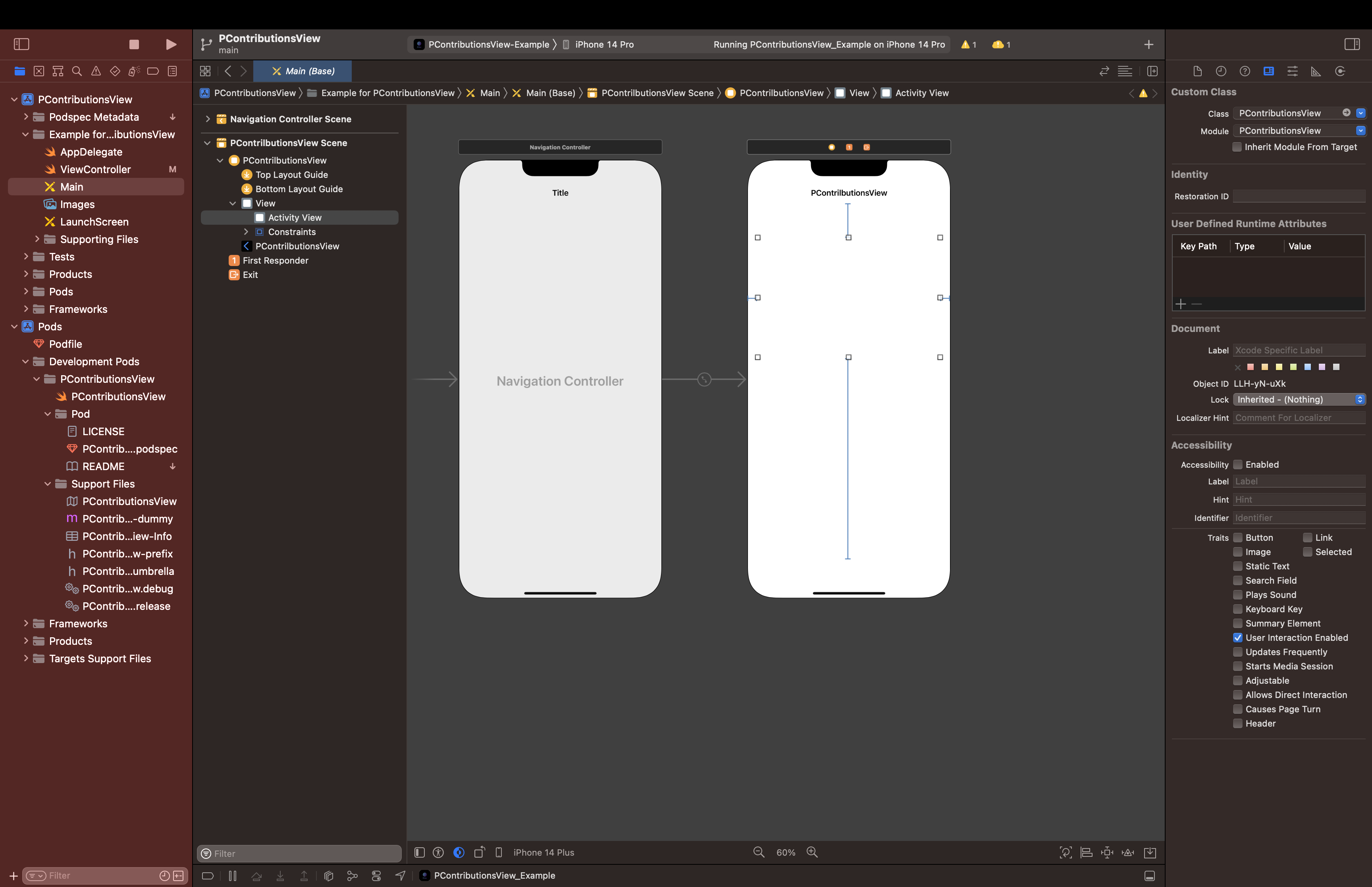
Use Interface Builder
1. Drag an UIView object to ViewController Scene
2. Change the `Custom Class` to `PContributionsView`
Or swift
var activityView: PContributionsView!// In Class
let dataSquare = [ ]
var contributionView = PContributionsView()
// In loadView or viewDidLoad
contributionView.contrilbutionsData = dataSquare
view.addSubview(contributionView)Example
To run the example project, clone the repo, and run `arch -x86_64 pod install` from the Example directory first.
Make Contributions Cell
var activityView: PContributionsView!// In Class
let dataActivity = [
[-1, 1, 1, 1, 2, 1, 1, 1, 3, 1, 2, 1, 1, 1, 2, 2, 2, 1, 1, 3],
[-1, 2, 1, 1, 2, 2, 1, 1, 2, 1, 2, 1, 1, 1, 4, 2, 1, 2, 1, 3],
[-1, 1, 1, 1, 2, 3, 1, 1, 1, 2, 2, 1, 1, 1, 1, 1, 1, 1, 1, 4],
[-1, 3, 4, 2, 1, 3, 1, 4, 1, 2, 1, 3, 1, 1, 2, 2, 1, 2, 2, 4],
[1, 2, 4, 3, 2, 3, 2, 3, 2, 1, 1, 2, 2, 1, 1, 2, 1, 1, 2],
[2, 3, 3, 3, 1, 3, 2, 3, 4, 1, 3, 3, 3, 2, 1, 1, 1, 3, 3],
[3, 1, 2, 2, 1, 3, 3, 2, 1, 1, 4, 2, 1, 1, 4, 4, 1, 2, 3]
]
var contributionView = PContributionsView()
// In loadView or viewDidLoad
// Interface Builder
activityView.contrilbutionsData = dataActivityChange Cell Color
var activityView: PContributionsView!// In loadView or viewDidLoad
activityView.userCustomColor(ColorMap("#F4F4F4", "#72FFFF", "#00D7FF", "#0096FF", "#5800FF"))default Color is githubContributionsColor
CellCornerRadius
var activityView: PContributionsView!// In Class
let dataSquare = [
[-1, 0, -1, 0, -1],
[0, -1, 0, -1, 0],
[-1, 0, -1, 0, -1],
[0, -1, 0, -1, 0],
[-1, 0, -1, 0, -1],
[0 ,-1 ,0, -1, 0]
]
// In loadView or viewDidLoad
activityView.cellCornerRadius(10)default shape is square
Color Level
// In Class
let dataSquare = [
[1, 2, -1, 4, -1],
[1, -1, 2, 1, 0],
[4, 2, -1, 0, -1],
[0, 4, 0, 2, 1],
[1, 0, -1, 0, -1],
[4 ,-1 ,0, -1, 1]
]-1 : NULL
0 : very light
1 : little light
2 : neutral
3 : bit darker
4 : very dark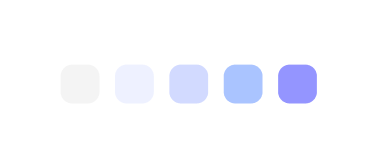
ContributionsCell Spacing
var activityView: PContributionsView!// In loadView or viewDidLoad
activityView.spacing = 5default Spacing is "2"
Change Shape
activityView.shapeType = .hexagon // .rectangle // .triangle // .pentagonlistBackgroud
var activityView: PContributionsView!// In Class
let dataActivity = [
[-1, 1, 1, 1, 2, 1, 1, 1, 3, 1, 2, 1, 1, 1, 2, 2, 2, 1, 1, 3],
[-1, 2, 1, 1, 2, 2, 1, 1, 2, 1, 2, 1, 1, 1, 4, 2, 1, 2, 1, 3],
[-1, 1, 1, 1, 2, 3, 1, 1, 1, 2, 2, 1, 1, 1, 1, 1, 1, 1, 1, 4],
[-1, 3, 4, 2, 1, 3, 1, 4, 1, 2, 1, 3, 1, 1, 2, 2, 1, 2, 2, 4],
[1, 2, 4, 3, 2, 3, 2, 3, 2, 1, 1, 2, 2, 1, 1, 2, 1, 1, 2],
[2, 3, 3, 3, 1, 3, 2, 3, 4, 1, 3, 3, 3, 2, 1, 1, 1, 3, 3],
[3, 1, 2, 2, 1, 3, 3, 2, 1, 1, 4, 2, 1, 1, 4, 4, 1, 2, 3]
]
let dataSquare = [
[-1, 0, -1, 0, -1],
[0, -1, 0, -1, 0],
[-1, 0, -1, 0, -1],
[0, -1, 0, -1, 0],
[-1, 0, -1, 0, -1],
[0 ,-1 ,0, -1, 0]
]
// In loadView or viewDidLoad
activityView.listBackground(.red)
dataActivity.listBackground(.green)What is the difference between listBackground and classic BackGround?
- listBackground is based on the created view, so if there are multiple views in one view, you can change the color of only the one you want.
- Existing background will not be a single selection.
ColorMap
PerfectContributionsView Color supported
// In loadView or viewDidLoad
let colorMap = VioletColorMap()
let c1 = colorMap.getColor(0)
let c2 = colorMap.getColor(1)
let c3 = colorMap.getColor(2)
let c4 = colorMap.getColor(3)
activityView.userCustomColor(ColorMap(c1, c2, c3, c4, c4))// Colors currently supported
let defaultColorMap = DefaultColorMap() // github green color
let violetColorMap = VioletColorMap() // Violet related colors
let shootingStarColorMap = ShootingStarColorMap() // shootingStar colorAuthor
- Github: jjunhaa0211
- Gmail: goodjunha@gmail.com
- Dm: jn_xhx
Realization
- The library still has many bugs. I will correct it little by little. If you find any bugs, please contact me. Advice is always welcome.
- 라이브러리에는 여전히 많은 버그가 있습니다. 조금씩 수정하겠습니다. 버그를 발견하면 저에게 연락하십시오. 조언은 언제나 환영합니다.
License
PContributionsView is available under the MIT license. See the LICENSE file for more info.
- 朴俊河
질문 & 답변
궁금한 점을 남겨주세요 — GitHub 로그인이 필요해요.